
Credit Crunch? What Credit Crunch By Angela Hart, Client Services Manager, Supreme Systems
Despite the downturn, this is definitely not the time for SMEs to be cutting down on their IT spend.
Credit crunch or not, small businesses need to embrace technologies that encourage better efficiencies and enhance productivity. IT dependant businesses need to ensure they have in place the right support to ensure their business is able to ride the current econmic storm. Reducing your IT spend may not necessarily be the right reaction to the current economic climate and in many cases such a reaction can be catastrophic for some businesses leaving them vulnerable.
At Supreme Systems we believe that SMEs simply need to ensure they are making sensible IT choices to ensure they are getting value for money on their IT spend. For example:
1. Rethink your decision to recruit an in-house IT specialist. A typical SME with 20 users could spend up to £25,000 per annum on recruiting an in-house IT specialist. Our team of engineers can provide IT services and support for a fraction of this cost - circa £10,000 per annum. In addition to this huge saving you are tapping into a wealth of IT expertise that no single in-house IT expert can possibly have. You also avoid administrative headaches such as PAYE obligations, contractual obligations etc.
2. IT need not be expensive. Try to match your requirements with packages to suit your needs. At Supreme Systems we have different support packages designed to suit your environment and your pocket. You can see an overview of our support packages here.
3. Go as you please and Pay As You go. Never go without an IT fall back. Pick a company you can trust to provide you with support services when you please. Our competitively priced Pay As You Go bundles will give you the peace of mind of having an on call IT specialist with no additional commitment.
4. Spend, Spend, Spend. The old adage "spend money to make money" applies here although we would advise businesses to spend money on IT intelligently. Spend more on boosting your internet presence. Redesign your website and implement search engine optimisation campaigns to drive traffic to your website; spend money on introducing processes designed to improve productivity such as introducing CRM packages to help you get the most out of your customer data; consider having your own bespoke software created rather than buying software off the shelf (a common misconception is that off the shelf is cheaper than bespoke - not true!)
Right now at Supreme Systems we have various special offers designed to suit every budget. From money-off offers for website design; discounts off our Pay As You Go packages and free systems audits, we will ensure that together we can beat the credit crunch.
For more information on how Supreme Systems can help you beat the credit crunch give us a call on 0800 0015 942 or email enquiry@supremesystems.co.uk.
Friday, 28 November 2008

Friday, 7 November 2008
Despite the downturn, this is definitely not the time for SMEs to be cutting down on their IT spend.
Credit crunch or not, small businesses need to embrace technologies that encourage better efficiencies and enhance productivity. IT dependant businesses need to ensure they have in place the right support to ensure their business is able to ride the current econmic storm. Reducing your IT spend may not necessarily be the right reaction to the current economic climate and in many cases such a reaction can be catastrophic for some businesses leaving them vulnerable.
At Supreme Systems we believe that SMEs simply need to ensure they are making sensible IT choices to ensure they are getting value for money on their IT spend. For example:
1. Rethink your decision to recruit an in-house IT specialist. A typical SME with 20 users could spend up to £25,000 per annum on recruiting an inhouse IT specialist. Our team of engineers can provide IT services and support for a fraction of this cost - circa £10,000 per annum. In addition to this huge saving you are tapping into a wealth of IT expertise that no single in-house IT expert can possibly have.
2. IT need not be expensive. Try to match your requirements with packages to suit your needs. At Supreme Systems we have different support packages designed to suit your environmeny and your pocket. You can see an overview of our support packages here.
3. Go as you please and Pay As You go. Never go without an IT fall back. Pick a company you can trust to provide you with support services when you please. Our competitively priced Pay As You Go bundles will give you the peace of mind of having an on call IT specialist with no additional commitment.
4. Spend, Spend, Spend. The old adage "spend money to make money" applies here although we would advise businesses to spend money on IT intelligently. Spend more on boosting your internet presence. Redesign your website and implement search engine optmimsation campaigs to drive traffic to your website; spend money on introducing processes designed to improve prductivity such as introducing CRM packages to help you get the most out of your customer data; consider having your own bespoke software created rather than buying sofyware off the shelf (a common misconception is that off the shelf is cheaper than bespoke - not true!)
For more information on how Supreme Systems can help you beat the credit crunch give us a call on on 0800 0015 942 or email enquiry@supremesystems.co.uk.
Credit crunch or not, small businesses need to embrace technologies that encourage better efficiencies and enhance productivity. IT dependant businesses need to ensure they have in place the right support to ensure their business is able to ride the current econmic storm. Reducing your IT spend may not necessarily be the right reaction to the current economic climate and in many cases such a reaction can be catastrophic for some businesses leaving them vulnerable.
At Supreme Systems we believe that SMEs simply need to ensure they are making sensible IT choices to ensure they are getting value for money on their IT spend. For example:
1. Rethink your decision to recruit an in-house IT specialist. A typical SME with 20 users could spend up to £25,000 per annum on recruiting an inhouse IT specialist. Our team of engineers can provide IT services and support for a fraction of this cost - circa £10,000 per annum. In addition to this huge saving you are tapping into a wealth of IT expertise that no single in-house IT expert can possibly have.
2. IT need not be expensive. Try to match your requirements with packages to suit your needs. At Supreme Systems we have different support packages designed to suit your environmeny and your pocket. You can see an overview of our support packages here.
3. Go as you please and Pay As You go. Never go without an IT fall back. Pick a company you can trust to provide you with support services when you please. Our competitively priced Pay As You Go bundles will give you the peace of mind of having an on call IT specialist with no additional commitment.
4. Spend, Spend, Spend. The old adage "spend money to make money" applies here although we would advise businesses to spend money on IT intelligently. Spend more on boosting your internet presence. Redesign your website and implement search engine optmimsation campaigs to drive traffic to your website; spend money on introducing processes designed to improve prductivity such as introducing CRM packages to help you get the most out of your customer data; consider having your own bespoke software created rather than buying sofyware off the shelf (a common misconception is that off the shelf is cheaper than bespoke - not true!)
For more information on how Supreme Systems can help you beat the credit crunch give us a call on on 0800 0015 942 or email enquiry@supremesystems.co.uk.
Wednesday, 18 June 2008
IT Training
By Shakeel Rashid, Technical Services Engineer of Supreme Systems. For more information on our products and services please contact me on 0845 009 5430 or alternatively email me on shakeel.rashid@supremesystems.co.uk
What is IT Training?
It does exactly what it says on the tin! This is the process of educating an individual or groups of individuals in the use of IT systems and products. Training subjects can vary from software related subjects like how to use Microsoft Outlook up to hardware related subjects such as how to connect to your wireless network.
How it Works
Picture this scenario. You work for a company called Supreme Systems Ltd as technical consultant. They have just acquired a new client by the name of Kleen Point. The manager of Kleen Point asked Supreme Systems to install a new wireless network for them. Within time Supreme Systems have installed the new wireless network and provided all the hardware which was also required such as the wireless router and USB wireless adapters for the computers. Now it is your turn to show the clients how to connect to the wireless network. You would generally talk them through what each device is and what it does. For example you will tell them that the wireless router is getting an internet connection from your Internet Service Provider (ISP), in turn that router is throwing out that signal via its antennas. You will then talk to them about the wireless USB stick and how it operates. Finally, you would educate them on how and where you would insert the SSID key (this isn’t important for this document, so don’t worry about it) and the WEP key (this also isn’t important right now, it’s just an example). Smack, bang, wallop...your job is done; you have trained your clients in how to connect to the internet using their wireless router! However you might have to go over it a couple of times though!!
Who are the users of this service?
The main people who acquire this service are those who have very little or no knowledge whatsoever of a particular software or computer hardware. The main bulk of these people are young ‘to be’ future IT professionals who are studying these subjects at both college and university level. However these days there are massive conferences held in big theatres for large companies who educate their employees on the use IT or any new system which is going to be introduced into the company.
Advantages and Disadvantages of IT Training
The advantages of IT Training are endless, for starter, a customer becomes very proficient at using the IT products which you have provided. At the same time your skills are also greatly enhanced because as the more you teach, the more you learn as well. The customer can also pay to do the training whenever THEY want it. A more informed workforce means a more proficient business, which in turn means that employees are better at following orders.
The disadvantages include the trainer having to keep going over the same thing again and again in a case where a customer doesn’t understand what is going on. This can get very frustrating for a trainer and a lot of patience is required. At times, hiring professional trainers can prove to be very very expensive.
http://www.SupremeSystems.co.uk
What is IT Training?
It does exactly what it says on the tin! This is the process of educating an individual or groups of individuals in the use of IT systems and products. Training subjects can vary from software related subjects like how to use Microsoft Outlook up to hardware related subjects such as how to connect to your wireless network.
How it Works
Picture this scenario. You work for a company called Supreme Systems Ltd as technical consultant. They have just acquired a new client by the name of Kleen Point. The manager of Kleen Point asked Supreme Systems to install a new wireless network for them. Within time Supreme Systems have installed the new wireless network and provided all the hardware which was also required such as the wireless router and USB wireless adapters for the computers. Now it is your turn to show the clients how to connect to the wireless network. You would generally talk them through what each device is and what it does. For example you will tell them that the wireless router is getting an internet connection from your Internet Service Provider (ISP), in turn that router is throwing out that signal via its antennas. You will then talk to them about the wireless USB stick and how it operates. Finally, you would educate them on how and where you would insert the SSID key (this isn’t important for this document, so don’t worry about it) and the WEP key (this also isn’t important right now, it’s just an example). Smack, bang, wallop...your job is done; you have trained your clients in how to connect to the internet using their wireless router! However you might have to go over it a couple of times though!!
Who are the users of this service?
The main people who acquire this service are those who have very little or no knowledge whatsoever of a particular software or computer hardware. The main bulk of these people are young ‘to be’ future IT professionals who are studying these subjects at both college and university level. However these days there are massive conferences held in big theatres for large companies who educate their employees on the use IT or any new system which is going to be introduced into the company.
Advantages and Disadvantages of IT Training
The advantages of IT Training are endless, for starter, a customer becomes very proficient at using the IT products which you have provided. At the same time your skills are also greatly enhanced because as the more you teach, the more you learn as well. The customer can also pay to do the training whenever THEY want it. A more informed workforce means a more proficient business, which in turn means that employees are better at following orders.
The disadvantages include the trainer having to keep going over the same thing again and again in a case where a customer doesn’t understand what is going on. This can get very frustrating for a trainer and a lot of patience is required. At times, hiring professional trainers can prove to be very very expensive.
http://www.SupremeSystems.co.uk
Tuesday, 27 May 2008
Software & Hardware Purchase and Installation
By Shakeel Rashid, Technical Services Engineer of Supreme Systems. For more information on our products and services please contact me on 0845 009 5430 or alternatively email me on shakeel.rashid@supremesystems.co.uk
What is Software & Hardware Purchase and Installation?
Software is a computer programme such as Norton Antivirus, it is not something which you can touch or feel i.e. it is not a physical piece of equipment, it is just a computer programme which runs electronically. Hardware on the other hand is a physical piece of equipment such as a computer mouse or a monitor. The process of buying it is simple and straightforward. You would normally buy BOTH elements from a vendor or a reseller. The process of installation is a bit more technical however and requires qualified and trained individuals to carry out the work.
How it Works
If you require a software installation, we would normally send out an engineer to install the software onto the system. During the process of installation, the programme would normally ask you if you want to install the programme so that several users have access to it. If you select this option then the software would be installed on the server and distributed to all the machines on the network. If you require a hardware installation then we would send an engineer out to install the hardware onto a machine(s). Let us take the example of installing RAM into one PC. You would first open the PC tower by unscrewing the screws which hold the cover on (be careful, because in some cases if you remove the cover of your machine then your warranty becomes void). You would then identify the slot where your RAM is to be inserted. It is usually located on the motherboard and looks something like this:
What is Software & Hardware Purchase and Installation?
Software is a computer programme such as Norton Antivirus, it is not something which you can touch or feel i.e. it is not a physical piece of equipment, it is just a computer programme which runs electronically. Hardware on the other hand is a physical piece of equipment such as a computer mouse or a monitor. The process of buying it is simple and straightforward. You would normally buy BOTH elements from a vendor or a reseller. The process of installation is a bit more technical however and requires qualified and trained individuals to carry out the work.
How it Works
If you require a software installation, we would normally send out an engineer to install the software onto the system. During the process of installation, the programme would normally ask you if you want to install the programme so that several users have access to it. If you select this option then the software would be installed on the server and distributed to all the machines on the network. If you require a hardware installation then we would send an engineer out to install the hardware onto a machine(s). Let us take the example of installing RAM into one PC. You would first open the PC tower by unscrewing the screws which hold the cover on (be careful, because in some cases if you remove the cover of your machine then your warranty becomes void). You would then identify the slot where your RAM is to be inserted. It is usually located on the motherboard and looks something like this:
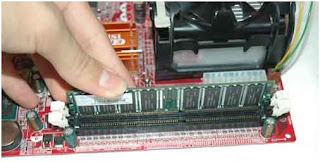
As you can see from the picture, that is how you would install your RAM. Be sure to always ensure that the RAM slots in PROPERLY and the clips on either side close properly.
Who are the users of this service?
You will find that the bulk of the users of this service will be small businesses. As their businesses are rapidly growing so will their IT needs, they will require more powerful machines and upgrades will be more frequent the faster they grow.
Advantages and Disadvantages of Software & Hardware Installation and Purchase
The only disadvantages that you may come across are the fact that in some cases if you keep upgrading your system(s) instead of purchasing new ones then you’re in actual fact wasting money because it could be cheaper for you in the long run if you invest in new machines (technology is advancing so fast that the professionals themselves have a hard time keeping up to date with it). Another potential disadvantage kind of ties in with the above point in the fact that if you keep upgrading instead of buying a new system then your motherboard on the computer may not support the new hardware/software which you have purchased. The advantages are endless, just to name a few there is the advantage that you get trained individuals to carry out all the necessary work which means there is a very small chance of anything going wrong. Another advantage is the fact that your systems will be up to date and able to support the next generation software and hardware which are coming out into the market.
Monday, 19 May 2008
Domain & Web Hosting
By Shakeel Rashid, Technical Services Engineer of Supreme Systems. For more information on our products and services please call me on 0845 009 5430 or alternatively email me on shakeel.rashid@supremesystems.co.uk.
What is Domain & Web Hosting?
This is the process of providing companies and individuals the service of hosting their website(s) on a server which everyone has access to over the internet.
How it Works
At the Supreme Systems offices, there is a server which hosts the company’s website. Its address is www.supremesystems.co.uk. When a user types that address in the web browser (for example Internet Explorer or Mozilla Firefox), the user will be redirected to the company’s server. How does the server know that you want to view the website and not access files? That is easy; this is done through what is called ports. Imagine this scenario. You are at a bank and there are several queues....one for each service, such as mortgages, paying in, credit cards and advice. You simply get into the right queue. Your web browser knows that you want to view a website so it automatically puts the following into the address:
www.supremesystems.co.uk:80
That colon 80 (:80) says that you want to view a website so you enter the correct door. Other services such as FTP use port 21, but you would normally use FTP software for it so you wouldn’t have to type that port number in. Every service has its own port number and port numbers start at the number 0 up to 65,535.
Who are the users of this service?
Anyone who wants their website hosted but cannot afford to buy a server and a public IP address can easily pay a company to host their website for them for a fraction of the price. The main bulk of users for this service are SME’s with relatively small websites. However, a lot of the general public who are members of clubs or communities put their information up on a website which is usually hosted on an IT service provider’s server.
Advantages and Disadvantages of Domain & Web Hosting
The only disadvantage that can be possible with this is the fact that if you are going to upload a website yourself and you’re not in the IT field then you will have BIG problems in trying to upload it and configure it so that potential viewers of the site can navigate to it. On the other hand, if you get an IT company to do everything for you, then within a couple of minutes you can have your website uploaded and ready to use.
Backups & Recovery - 999Restore
By Shakeel Rashid, Technical Services Engineer of Supreme Systems. For more information on our products and services please call me on 0845 009 5430 or alternatively email me on shakeel.rashid@supremesystems.co.uk.
What is Backups & Recovery?
Backup refers to making copies of data so that these additional copies can later be used to restore lost or corrupted files in the event of a disaster or a data loss event. Recovery refers to the process of ‘recovering’ that data, either in the form of retrieving data from a damaged hard drive or storage media or downloading it from an online storage space and putting it back where it was supposed to belong.
How it Works
If you work for a company, you may find that every week the guys in the IT department usually put an allotted time on the server for it to start making copies of all the files it holds on its hard drive. These copies are generally stored on media devices such as tapes or DVD discs (DVD’s are only used when small amounts of data up to 4GB need to be backed up). Slowly, companies are starting to take this to another level and have started to backup all their data on either a SAN (Storage Area Network) where extremely large volumes of data can be held or online where data ranging from 50GB to 1TB (Terabyte = 1024GB) can be stored. Once all the data has been backed up (for example on a tape), it is stored in a safe place where there is minimum risk of damage or loss. Sometimes multiple copies of that same tape are made just to be sure.
Who are the users of this service?
Users for this service can be absolutely anybody who uses computers! However, people who generally use this service are usually small and medium sized businesses and certainly every single large multimillion/billion pound corporation that you can possibly think of. It is especially important for large companies as they have endless amounts of data which they must make sure cannot be lost in any instance whatsoever.
Advantages and Disadvantages of Backups & Recovery
The obvious advantage is that you can backup all your data in case of an unfortunate event such as a computer hard drive crash or malfunction. Imagine you are working on a presentation late at night which you must give to your boss the first thing in the morning and suddenly ‘POOF’ your computer switches off and there goes all your hard work and effort. If you don’t have a backup system in place you can imagine the predicament that you are in. Thankfully, you do have a backup system in place and all you do is just restore all the data which you lost thanks to recovery software and off you go continuing your work. You can imagine how helpful this service is when it comes to business critical times.
There are a few disadvantages though. For example the privacy of your data, whoever you give your files to, they will more than likely be able to read all that sensitive information about your company and your clients. Important information such as bank account details, addresses, national insurance numbers and the list goes on and on. Another problem is that if you are a large corporation then more than likely you’re going to need to backup every single spec of your data. This can take an extremely long time and has a heavy impact on the performance of your network as you are just eating away all those network resources.
http://www.SupremeSystems.co.uk
What is Backups & Recovery?
Backup refers to making copies of data so that these additional copies can later be used to restore lost or corrupted files in the event of a disaster or a data loss event. Recovery refers to the process of ‘recovering’ that data, either in the form of retrieving data from a damaged hard drive or storage media or downloading it from an online storage space and putting it back where it was supposed to belong.
How it Works
If you work for a company, you may find that every week the guys in the IT department usually put an allotted time on the server for it to start making copies of all the files it holds on its hard drive. These copies are generally stored on media devices such as tapes or DVD discs (DVD’s are only used when small amounts of data up to 4GB need to be backed up). Slowly, companies are starting to take this to another level and have started to backup all their data on either a SAN (Storage Area Network) where extremely large volumes of data can be held or online where data ranging from 50GB to 1TB (Terabyte = 1024GB) can be stored. Once all the data has been backed up (for example on a tape), it is stored in a safe place where there is minimum risk of damage or loss. Sometimes multiple copies of that same tape are made just to be sure.
Who are the users of this service?
Users for this service can be absolutely anybody who uses computers! However, people who generally use this service are usually small and medium sized businesses and certainly every single large multimillion/billion pound corporation that you can possibly think of. It is especially important for large companies as they have endless amounts of data which they must make sure cannot be lost in any instance whatsoever.
Advantages and Disadvantages of Backups & Recovery
The obvious advantage is that you can backup all your data in case of an unfortunate event such as a computer hard drive crash or malfunction. Imagine you are working on a presentation late at night which you must give to your boss the first thing in the morning and suddenly ‘POOF’ your computer switches off and there goes all your hard work and effort. If you don’t have a backup system in place you can imagine the predicament that you are in. Thankfully, you do have a backup system in place and all you do is just restore all the data which you lost thanks to recovery software and off you go continuing your work. You can imagine how helpful this service is when it comes to business critical times.
There are a few disadvantages though. For example the privacy of your data, whoever you give your files to, they will more than likely be able to read all that sensitive information about your company and your clients. Important information such as bank account details, addresses, national insurance numbers and the list goes on and on. Another problem is that if you are a large corporation then more than likely you’re going to need to backup every single spec of your data. This can take an extremely long time and has a heavy impact on the performance of your network as you are just eating away all those network resources.
http://www.SupremeSystems.co.uk
Wednesday, 7 May 2008
Networking
By Shakeel Rashid, Technical Services Engineer of Supreme Systems. For more information on our products and services please contact me on 0845 009 5430 or alternatively email me on shakeel.rashid@supremesystems.co.uk
What is Networking?
A network comprises of two or more interconnected computers. They are usually connected so that both computers can share resources, for example they may want to share an internet connection or just for the sake of sharing files. A network will usually be of two types, either a wired network, where there are wires connecting all computers and devices or a wireless network, where there will be no wires and every workstation will normally have a wireless network adapter of some sort, usually this is a USB wireless stick.
A network of 2 – 100 computers can be classified as a LAN (Local Area Network):
 A network of 300 – 10,000+ can be classified as a WAN (Wide Area Network), these networks usually span very large geographical areas. For example one group of computers reside in Birmingham, another group resides in Paris and one group resides in New York, USA. The best way to describe a WAN is an interconnection of LANS.
How it Works
To connect to a network you will require an NIC (Network Interface Card) which usually is a port on the back of a computer where you connect the following wire:

A network of computers is usually connected up in a following way or in computer terminology a ‘topology’. There are several ways in which you can network computers. They are the following:
· Bus Topology


What is Networking?
A network comprises of two or more interconnected computers. They are usually connected so that both computers can share resources, for example they may want to share an internet connection or just for the sake of sharing files. A network will usually be of two types, either a wired network, where there are wires connecting all computers and devices or a wireless network, where there will be no wires and every workstation will normally have a wireless network adapter of some sort, usually this is a USB wireless stick.
A network of 2 – 100 computers can be classified as a LAN (Local Area Network):
A network of 300 – 10,000+ can be classified as a WAN (Wide Area Network), these networks usually span very large geographical areas. For example one group of computers reside in Birmingham, another group resides in Paris and one group resides in New York, USA. The best way to describe a WAN is an interconnection of LANS.
How it Works
To connect to a network you will require an NIC (Network Interface Card) which usually is a port on the back of a computer where you connect the following wire:
A network of computers is usually connected up in a following way or in computer terminology a ‘topology’. There are several ways in which you can network computers. They are the following:
· Bus Topology
· Star Topology
· Ring Topology
These topologies are the most commonly used methods of interconnecting computers and creating networks.
Who are the Users of this Technology?
Almost everybody who has a connection to the internet is using the network technology, ranging from home users who are just viewing videos on YouTube up to corporate companies who need to share data between departments. To see the real power of networks and really see it in action you need to go to a large company where there are up to 100 computers in one room alone! You will see how everybody connects to the server to get access to data or if they want to simply do a bit research and use the internet.
Advantages and Disadvantages of Networking
The main advantages of networking are the fact when you have a large user and employee base, you can share expensive software such as the Microsoft Office product line. All you have to do is buy one copy of it and install that on the server for everybody else to share. Other advantages include real time communication over large geographical areas and the sharing of business critical information.
The disadvantage included is the reality of you having to employ a potentially expensive employee who is highly skilled and qualified in looking after networks. Not any person can take care of switches, routers, mainframes and servers. Another disadvantage is the fact that networks can cause huge losses to business when they are not carefully and properly installed. A complex network will be extremely hard to troubleshoot when a failure occurs, which will result in massive administrative overheads.
Subscribe to:
Posts (Atom)